Website care
Domain, hosting, and website builder explained
Your domain is the address. Hosting is where the site is served from. The builder is the tool used to make its pages. One company can provide all three, or each can be somewhere different.
The whole process, at a glance
- Find the address provider1 of 3
- Find where the site lives2 of 3
- Find the editing tool3 of 3
Before you start
Use this before sharing access or discussing a redesign. Gather your website URL, renewal emails, invoices, and the login page you normally use to edit the site. You do not need to change anything.
A practical example
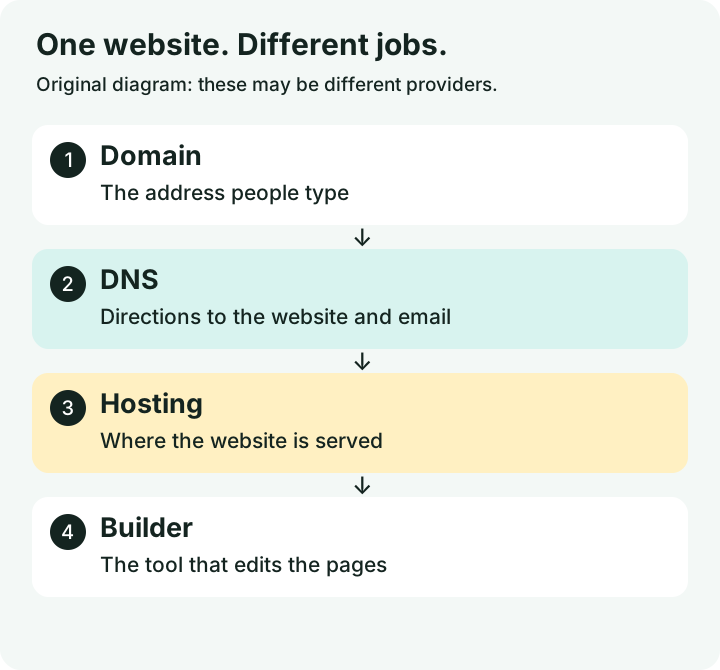
| Piece | Everyday comparison | Where to look |
|---|---|---|
| Domain | Your street address | Domain renewal receipt |
| DNS | Directions to the right destination | Nameservers and DNS dashboard |
| Hosting | The building where the site lives | Hosting invoice or platform dashboard |
| Builder | The tools used to decorate it | Website editor login |
| Your separate mail service | Email subscription and admin account |
Follow these steps
Find the domain registrar
The registrar manages the registration and renewal of your domain, such as
example.com. Search your business email for domain renewal receipts. ICANN Lookup can identify the registrar for many domains, but privacy protection may hide the registrant. Confirm ownership in the actual account.Find the DNS provider
DNS is the signpost that directs your domain to your website and email services. It may be managed by the registrar or another company. Nameservers are a clue to the DNS provider, not proof of who hosts the site. Record the provider and account owner; leave the records alone while identifying them. To look up the public nameservers, open Google Admin Toolbox Dig, enter only your domain in Name, and choose NS. Read the TARGET names. This tool looks up records; it does not edit them.

Enter your own domain without https:// or a page path, then select NS. WinflowAI is the example, captured September 6, 2026. Select the image to enlarge. 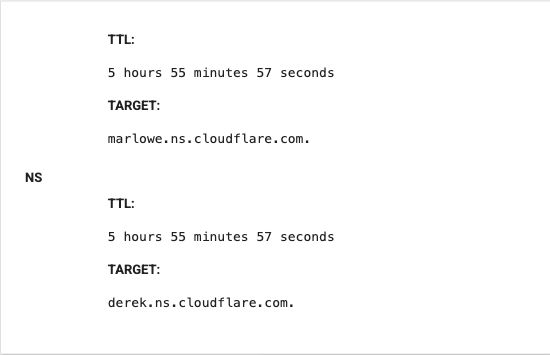
The cloudflare.com names are a clue to the DNS provider. They do not identify the website host or prove who owns the account. This is a lookup result, not a settings screen. Select the image to enlarge. Find the hosting or all-in-one platform
Look at hosting invoices and your website dashboard. Shopify and many hosted builders bundle the editor and hosting. WordPress can run at many different hosts. A logo in the site footer is only a clue. A CDN, which helps deliver files, may hide the underlying host.
Find the tool that edits your pages
Open the admin URL you already use. Record the product name and the person who has owner or administrator access. A domain login may not include the website editor. Conversely, the website designer may have editor access but no control over domain renewal.
Map email before anyone changes DNS
Record your business email provider too. DNS changes can affect email delivery as well as the site. Ask the developer which exact account they need and what they plan to change. A redesign does not automatically require transferring a domain, moving hosting, or changing email. In the same lookup tool, select MX to see where incoming email is directed. Compare the EXCHANGE destination with the provider named in your email account or invoices. Routing services can sit in front of a mailbox, so confirm the account rather than guessing from one record.
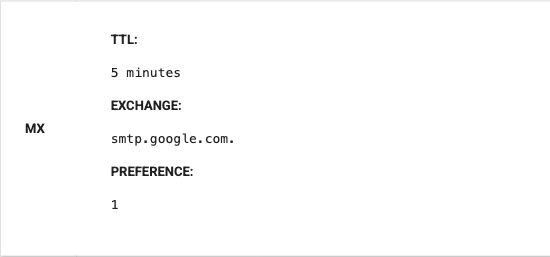
MX answers a different question from NS: where incoming email is directed. WinflowAI’s public result points to Google in this September 6, 2026 capture. Do not copy these records into your own DNS settings. Select the image to enlarge.
You’re finished when…
You have a provider and account owner for the domain, DNS, website hosting, editor, and email. Any unknowns are documented before changes begin.
If you get stuck
I pay one company for everything
That is possible. Write each role on your list anyway so you know what the package includes.
The old agency owns an account
Ask which assets the business controls and request an orderly handover. Do not cancel services while you are still identifying dependencies.
Do I need to buy a second domain?
Usually this inventory does not require a purchase. First establish what you already own and what the project actually needs.
Official sources and further reading
- MDN: what a domain name is
- ICANN: registration lookup
- Cloudflare: what DNS does
- Google Admin Toolbox: read-only DNS lookup
Reviewed September 6, 2026. Platform menus can vary by account and change over time. Examples and checklists are WinflowAI’s own guidance; follow the linked vendor instructions for your account.
Useful next guides


Need help with your website or inquiry workflow? See how WinflowAI can help.