Account access · Hostinger
Share access to Hostinger
Your website needs a place to live. Hostinger provides that space. Account Sharing lets someone work on it with their own login.
The whole process, at a glance
- You choose the services 1 of 3
- You send an invitation 2 of 3
- Your developer accepts 3 of 3
Before you start
Sign in to your own Hostinger account as the owner. Have your developer’s invitation email ready; use the address in your project’s access request.
Follow these steps
-
Open Account Sharing
Sign in to hPanel. Select your profile icon, then Account Sharing → Give Access.
hPanel → Profile → Account Sharing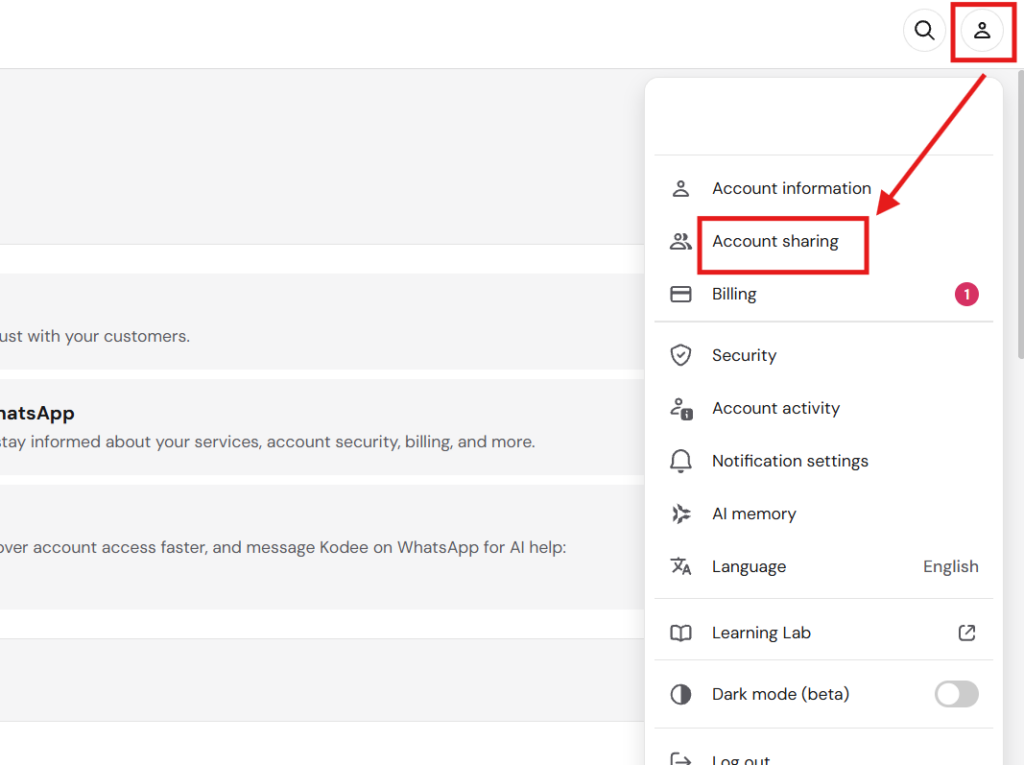
Open your profile menu and choose Account sharing. The profile icon may appear in a different corner of your account. Source: Hostinger Help Center. Select the image to enlarge. 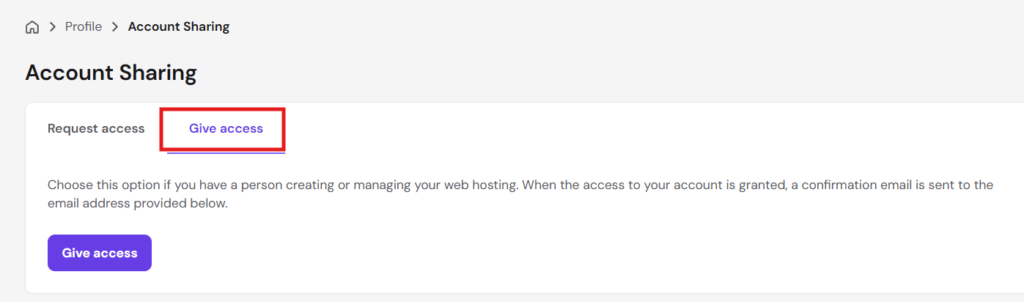
Choose the Give access tab, then the purple Give access button. Source: Hostinger Help Center. Select the image to enlarge. -
Choose the role and services
Enter the invitation email and choose Collaborator. Select the hosting plan for website work; include the domain service if DNS changes are needed.
Collaborator + the services you agreed on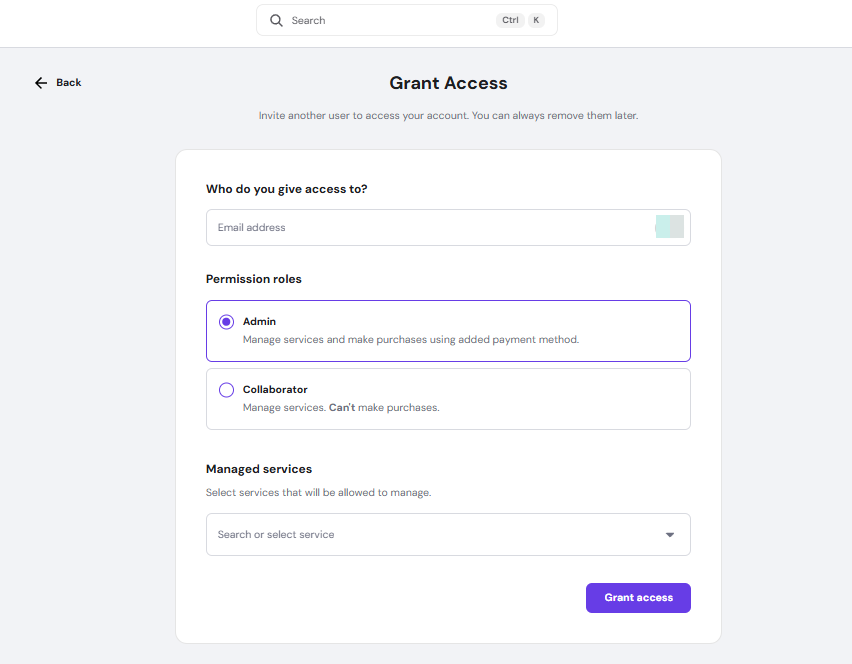
Choose Collaborator for this guide. Hostinger’s example has Admin selected. Enter the invitation email and select the agreed services below the roles. Source: Hostinger Help Center. Select the image to enlarge. -
Check the scope, then invite
Standard hosting-plan sharing covers all websites on that plan. If that is too broad, use the Agency option below or discuss narrower access first. Otherwise, select Give Access.
Check what is included before you send -
Wait for acceptance
Your developer accepts the email invitation using their own Hostinger account, or creates one. Ask them to confirm they can open the right website.
Invitation sent → accepted → website checked
You’re finished when…
You have sent the invitation, and your developer has confirmed they can reach the website. Sending an invite is only the first half.
If you get stuck
Hosting and domain: which do I share?
Think of hosting as the building and the domain as its street address. Domain-only access allows DNS management, which controls where the address points. Website files require hosting access. If your domain is managed elsewhere, arrange access there separately.
I have an Agency hosting plan
In Websites, use the sharing icon beside the specific website, enter the invitation email, and select Send invite. The recipient accepts by email. See the Agency instructions below.
The invitation has not arrived
Check the email address and spam folder. Hostinger says delivery can take up to 15 minutes. If needed, send the invitation again.
How do I remove access later?
Return to Account Sharing, find the person in the list of users with access, and use ⋮ → Remove access.
Official instructions
Checked against these documents on September 6, 2026. Menus can vary by account and change over time. If your screen differs, use the official guide or ask us before choosing broader access.
Sharing another account?


Working with WinflowAI? Reply to your project email if you need help with a step.