Account access
How to share Porkbun access with your developer
Porkbun lets another person work through their own login. Its Authorized User feature grants broad access to your account, so check the scope before inviting someone.
The whole process, at a glance
- Check the scope1 of 3
- Invite their username2 of 3
- Verify and review access3 of 3
Before you start
Authorized Users can manage all domains in your account, make purchases, and manage saved payment methods. This is not a one-domain or DNS-only role. Both accounts need verified email addresses and phone numbers, plus an authenticator app or security key for two-factor authentication (2FA). Ask for the recipient’s existing Porkbun username.
Follow these steps
Decide whether this access fits the job
Use Authorized Users only when you intend to grant access across the account. Porkbun’s comparison says these users cannot change your account password or contact details, change registrant contacts, unlock or transfer domains, change WHOIS privacy, or list domains in its auction or marketplace. Those restrictions still leave substantial control. For one small DNS change, having the owner apply the developer’s exact instructions may be enough.
Option What it means Authorized User Another existing Porkbun account gets access to all your domains, plus purchasing and payment controls Subaccount A separate setup you create and manage, limited to domains placed in it; direct-login users still have purchasing/payment capabilities Owner makes the change Your developer supplies exact instructions; you keep account access to yourself Open Authorized Users
Sign in at Porkbun. Open ACCOUNT → Authorized Users.
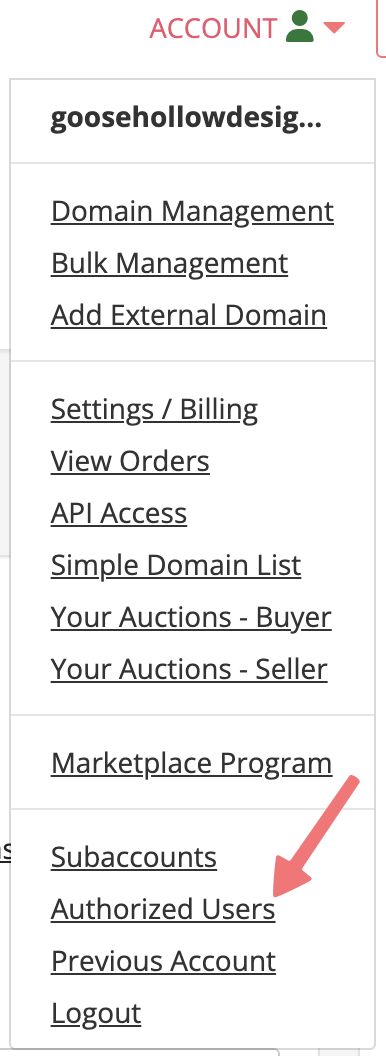
Choose Authorized Users in the account menu. The username is Porkbun’s example account. Unmodified Porkbun Help screenshot, checked September 6, 2026. Select the image to enlarge. Send the username invitation
Under Add Authorized User, enter the recipient’s Porkbun Username and select Submit. This sends the invitation. Confirm the username with the developer first.
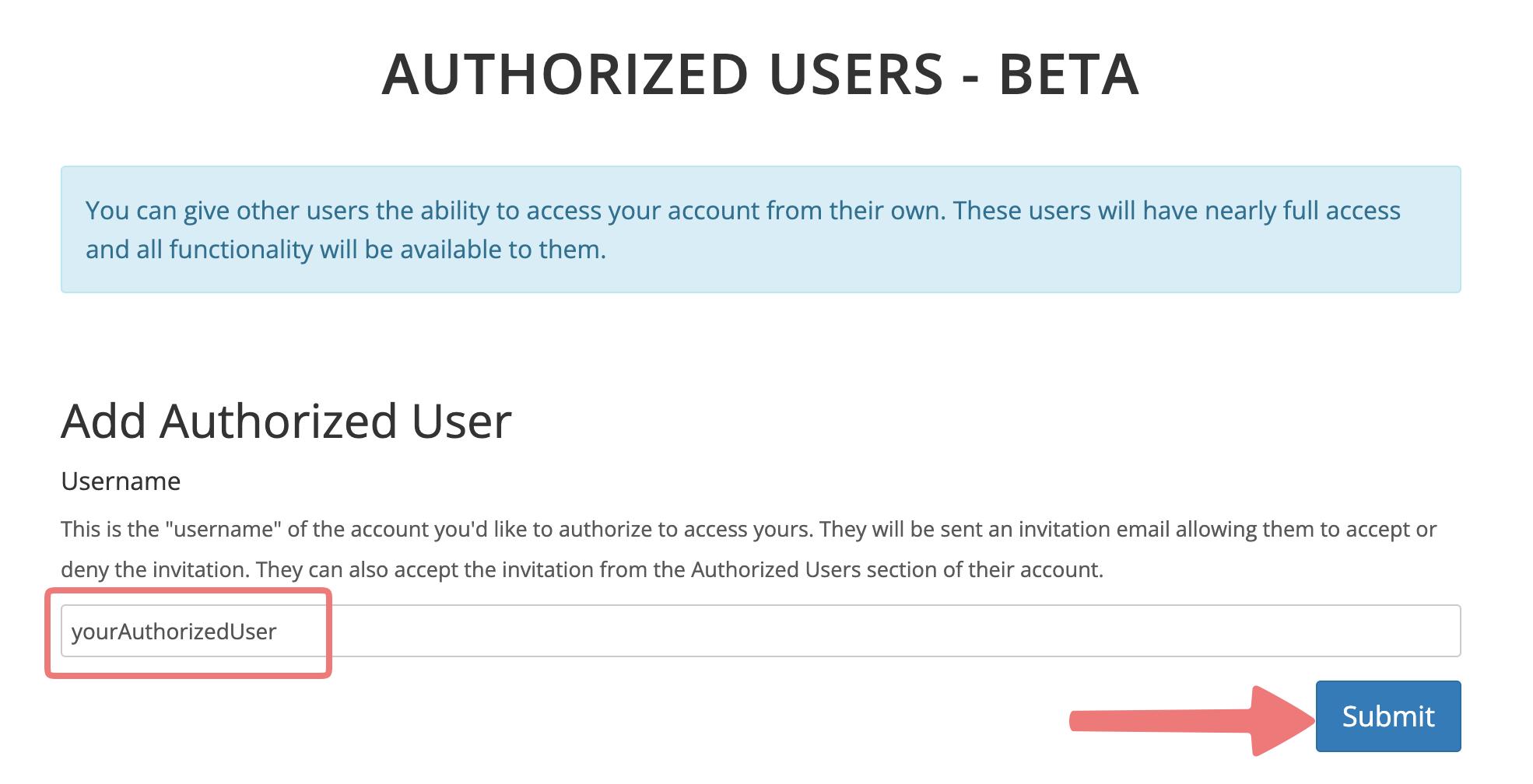
Enter the developer’s actual Porkbun username. The source screenshot calls this feature Beta. Unmodified Porkbun Help screenshot, checked September 6, 2026. Select the image to enlarge. Have the recipient accept
The recipient opens the invitation email’s Accept or Decline Access link, checks the owner account, and accepts. The Authorized Users page also shows pending access.
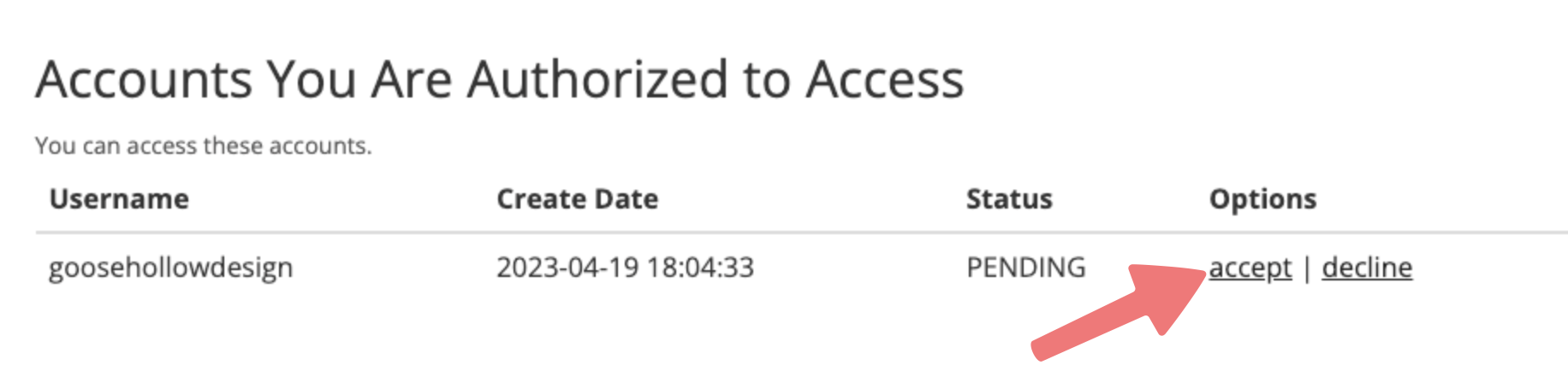
Recipient view: confirm the owner account before accepting. The name and date are vendor example data. Unmodified Porkbun Help screenshot, checked September 6, 2026. Select the image to enlarge. Verify the separate login works
After acceptance, the recipient can use login beside the account under Accounts You Are Authorized to Access. Ask them to confirm the intended account and domain. Agree on the changes before they make them.
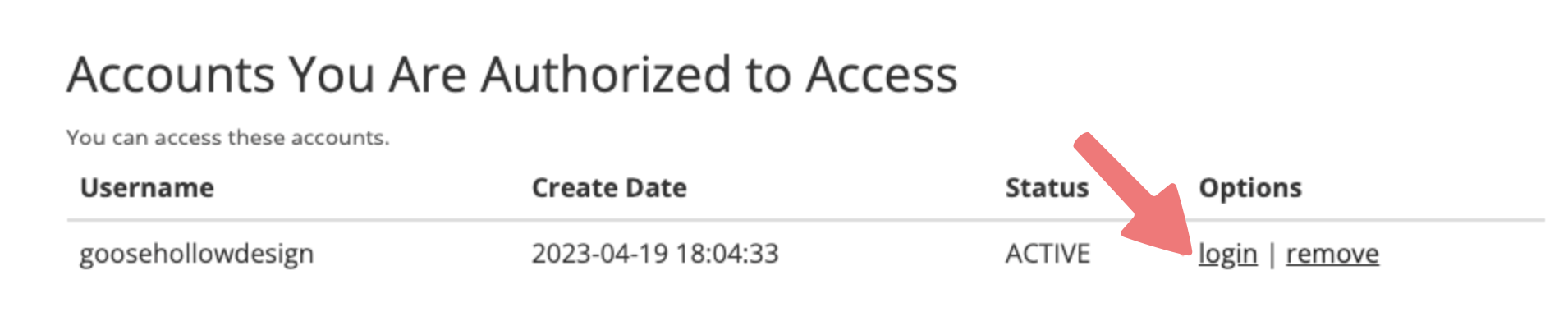
Recipient view after acceptance: login opens the account they were authorized to manage. Unmodified Porkbun Help screenshot, checked September 6, 2026. Select the image to enlarge. Remove access when the work ends
In your account, return to ACCOUNT → Authorized Users. Under Your Authorized Users, use remove beside the intended username and complete any confirmation. Recheck the list.
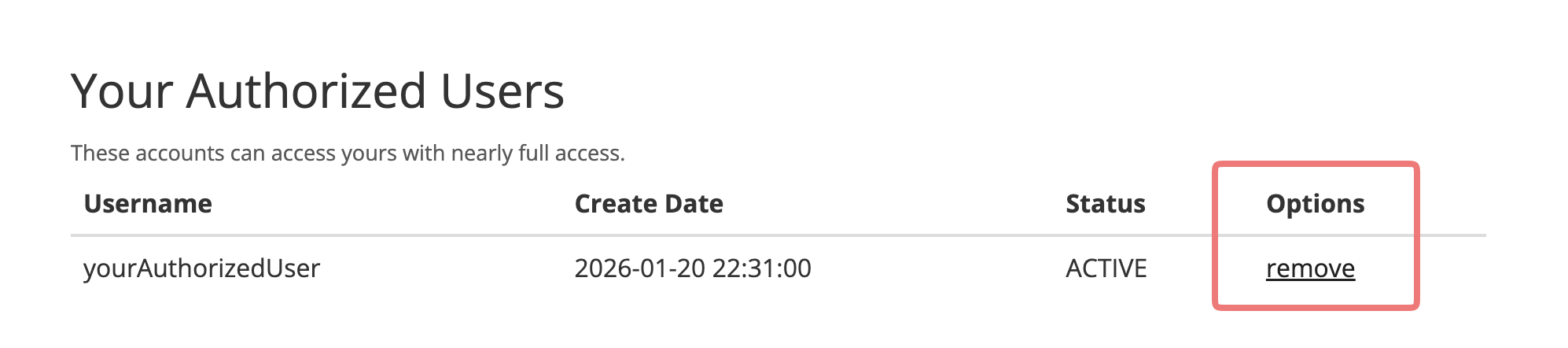
Owner view: remove the intended user here when access is no longer needed. Unmodified Porkbun Help screenshot, checked September 6, 2026. Select the image to enlarge.
You’re finished when…
The recipient has accepted, can enter the correct account through their own login, and understands the agreed work. You have a date to review or remove their access.
If you get stuck
Can I limit an Authorized User to one domain?
Porkbun’s comparison lists access to all domains under your account. Its subaccount feature is a different setup for domains placed in that subaccount. Read Porkbun’s comparison before moving domains or changing your account structure.
Why will the invitation not work?
Check both accounts’ email and phone verification, then confirm both use app-based 2FA or a security key. Also check that you entered the Porkbun username, not an assumed email address.
Does the developer need my password or API key?
No. This walkthrough uses the developer’s own Porkbun account. API credentials are a different access method and are not needed for this invitation.
Is sharing access the same as moving my website?
No. Access lets someone manage settings; it does not migrate your website. First confirm the domain, DNS, hosting, and email providers so everyone knows which change is intended.
Official sources and further reading
- Porkbun: invite, accept, access, and remove Authorized Users
- Porkbun: permissions for Authorized Users and subaccounts
Reviewed September 6, 2026. Platform menus can vary by account and change over time. Examples and checklists are WinflowAI’s own guidance; follow the linked vendor instructions for your account.
Useful next guides

Need help with your website or inquiry workflow? See how WinflowAI can help.