Website care
How to tell where website inquiries come from
A visit is someone arriving. An inquiry is someone contacting you. Measure both, but use your saved inquiries to judge whether the website is bringing useful work.
The whole process, at a glance
- Label incoming links1 of 3
- Save the inquiry source2 of 3
- Compare useful inquiries3 of 3
Before you start
This is for a business owner working with a website or analytics implementer. Your form must already work. Decide where inquiries are saved and who can change form fields and analytics settings.
A practical example
| Saved example field | Value |
|---|---|
| Submission | TEST-UTM-01 |
| Source / medium | google / organic |
| Campaign | business_profile |
| Result | Suitable inquiry, awaiting reply |
| What it proves | The tagged-link path worked for this test |
Follow these steps
Choose a simple source convention
UTM tags are labels added to a link. Use consistent lowercase values for the source, medium, and campaign. For example, a website link on your business listing could use
utm_source=google,utm_medium=organic, andutm_campaign=business_profile. This is a labeling convention, not a special Google requirement.Build and test the link
A complete example is
https://example.com/contact/?utm_source=google&utm_medium=organic&utm_campaign=business_profile. Replace the example domain with your real page. Open it and confirm it loads without losing the tags. If the URL already has a question mark, add new parameters with&. Do not put customer names, emails, or private information in these labels.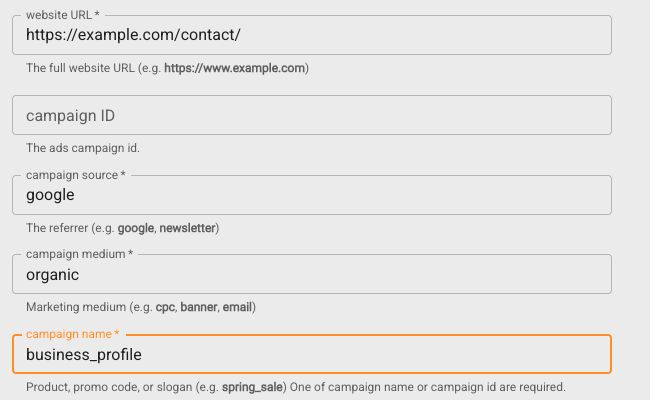
Actual Google Campaign URL Builder, captured September 6, 2026. These fictional example values produce the link shown in this step. Generating the link does not install tracking or save source fields in your form. Select the image to enlarge. 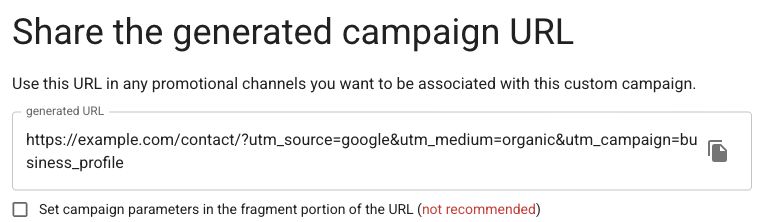
Copy the generated URL with the icon on its right, then test your real destination. Leave fragment mode unchecked. Actual Google Campaign URL Builder with fictional example.com values, September 6, 2026. Select the image to enlarge. Save labels alongside a successful inquiry
Ask your implementer to copy allowed UTM values from the landing URL into saved form fields. For a simple same-page form, the inquiry record can store
source=google,medium=organic, andcampaign=business_profile. If visitors navigate to another page first, preserving the labels needs an explicit storage and consent decision. Hidden fields are editable by visitors, so treat them as descriptive data, not trusted instructions.Count successful submissions separately
Where GA4 is in use, ask the implementer to record a successful lead action, such as the recommended
generate_leadevent, and mark the appropriate event as a key event. A submit-button click or attempted submission can overcount. Test the event against a real saved test entry. Never send the visitor’s message or contact details to Analytics.Compare records and acknowledge gaps
Review inquiries, suitable inquiries, and bookings over the same dates. Exclude labeled tests and spam. Analytics may miss visits because of consent, blockers, cross-device journeys, or lost tags. Ask “How did you hear about us?” when useful, and keep unknown sources as unknown. A tagged visit does not prove that channel deserves all credit for a sale.
You’re finished when…
A labeled test reaches the correct page, its saved inquiry contains the expected source, and any analytics event represents the action you intended.
If you get stuck
Can I just look at traffic?
Traffic tells you about visits. Check inquiry records and later outcomes before deciding which channels bring suitable work.
Why do Analytics and the CRM disagree?
They count different things and have different visibility. Match the reporting dates, remove test records, and document how each metric is defined.
Should I tag links inside my own website?
Keep campaign tags for incoming campaigns. Tagging internal navigation can confuse measurement; use your normal internal links.
Official sources and further reading
- Google: campaign URL parameters
- Google: recommended generate_lead event
- Google: avoid personally identifiable information
Reviewed September 6, 2026. Platform menus can vary by account and change over time. Examples and checklists are WinflowAI’s own guidance; follow the linked vendor instructions for your account.
Useful next guides

Need help with your website or inquiry workflow? See how WinflowAI can help.