Account access
How to share Google Analytics 4 access
Google Analytics 4, or GA4, helps you understand visits and actions on your website. Share the property for the website being worked on, then choose what the person can do.
The whole process, at a glance
- Find the property1 of 3
- Choose the permission2 of 3
- Check the correct site3 of 3
Before you start
An Administrator for the relevant account or property should do this. Ask your agency for its Google Account email and whether it needs reporting access or permission to change measurement settings.
Follow these steps
Find the website’s property
Open Google Analytics and select the intended account and property. In Admin, check the property details and, if one exists, the web data stream against the website. A new property can be shared before data collection is configured. The business should know who holds Administrator access. Inviting an agency does not move the property into a different account.
Choose property access for one website
An account is a folder that can hold several properties. A property is a measurement container for a website or app. Account permissions flow down to its properties. For work on one property, open Admin → Property access management.
Where you add them What that means Account access management Access applies to the properties inside that account Property access management Access applies to this property; inherited access may also exist 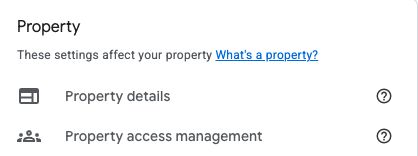
Actual Google Analytics interface, captured September 6, 2026 in WinflowAI’s own property. Choose Property access management for work on this website. Account access management is a separate control with broader scope. Select the image to enlarge. Choose the least access that fits
Use Viewer for reading reports. Analyst adds exploration-sharing capabilities. Marketer covers audiences, key events, and attribution settings. Editor can change property settings but cannot manage users. Administrator can manage users too. Data restrictions may limit revenue or cost information. Confirm the actual work before choosing.
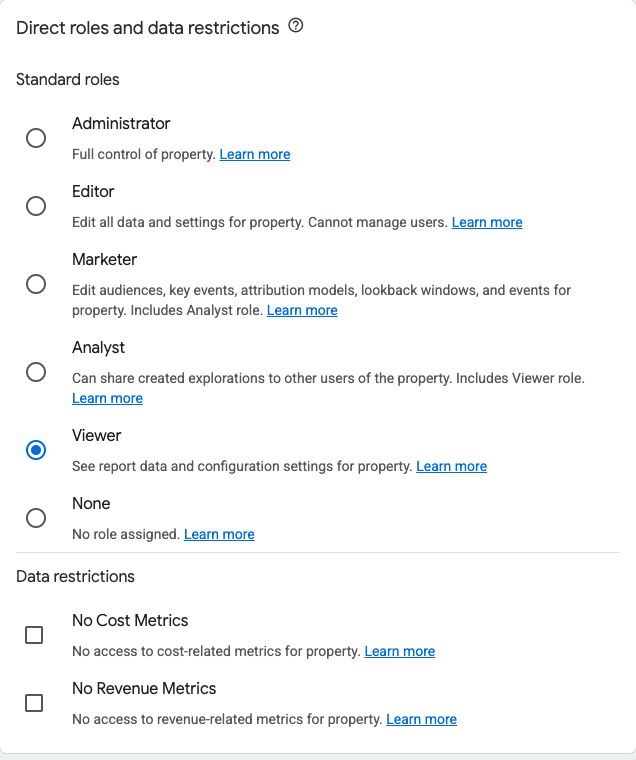
Actual GA4 property invitation controls, captured September 6, 2026. Viewer is the reporting-only example shown here. Choose Editor when the agreed work requires property configuration; Administrator also permits user management. No invitation was sent for this capture. Select the image to enlarge. Add the Google Account email
In access management select + → Add users. Enter the email, select Notify new users by email, choose the permissions, then Add. Ask the recipient to sign in and open the exact property. Share its property name or ID, not your password.
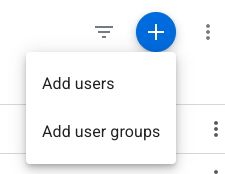
Actual GA4 property-access menu, captured September 6, 2026. Select the blue plus button, then Add users. Select the image to enlarge. 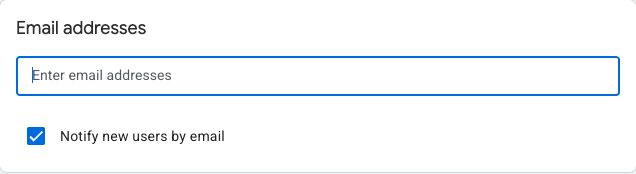
Enter the recipient’s Google Account email here. The blank field is intentional: this live capture contains no personal email address. Captured September 6, 2026 in WinflowAI’s property. Select the image to enlarge. Check inherited access before removing someone
Reopen access management and inspect the person’s permissions. Access inherited from the account cannot be reduced just at the property. Have an account Administrator handle complete user removal, and check any group or organization access too. Keep a business-controlled Administrator in place.
You’re finished when…
The recipient can open the intended property and do the agreed task. Your own Administrator access still works.
If you get stuck
There is no Add users option
Use the correct account and property, then check that you have Administrator permission at that level.

Access works but the reports are empty
Sharing access does not install GA4. Check the web stream, date range, and tag setup separately. A quiet website can also have little recent data.
Should every agency get Administrator?
No. Reporting and configuration are different jobs. Choose a role for the agreed task and increase it only when a specific action needs it.
Official sources and further reading
- Google: add, edit, and delete Analytics users
- Google: roles and data restrictions
- Google: Analytics hierarchy
Reviewed September 6, 2026. Platform menus can vary by account and change over time. Examples and checklists are WinflowAI’s own guidance; follow the linked vendor instructions for your account.
Useful next guides

Need help with your website or inquiry workflow? See how WinflowAI can help.