Website care
How to write better contact form questions
Ask only what helps you decide whether you can help and what should happen next. A short form can still give you enough information to reply properly.
The whole process, at a glance
- Decide what matters1 of 3
- Ask simple questions2 of 3
- Explain the next step3 of 3
Before you start
Write down your ideal work, work you do not take, and the person who replies. Use the real business rules rather than adding fields because another website has them.
Follow these steps
Start with the decision you need to make
For an office-cleaning business, the first questions might be “Is this a workplace?”, “Is it in our service area?”, and “What cleaning is needed?” Each answer should help you route or prepare a reply. If a field does not change your next action, consider removing it or asking later.
Choose a small set of clear fields
A practical starting set is name, email, type of work, city, and a short message. Ask for a phone number if you will actually call. Mark optional fields explicitly. Use choices for categories you know, and leave room for uncertainty. An upload can be optional; state accepted file types and size limits.
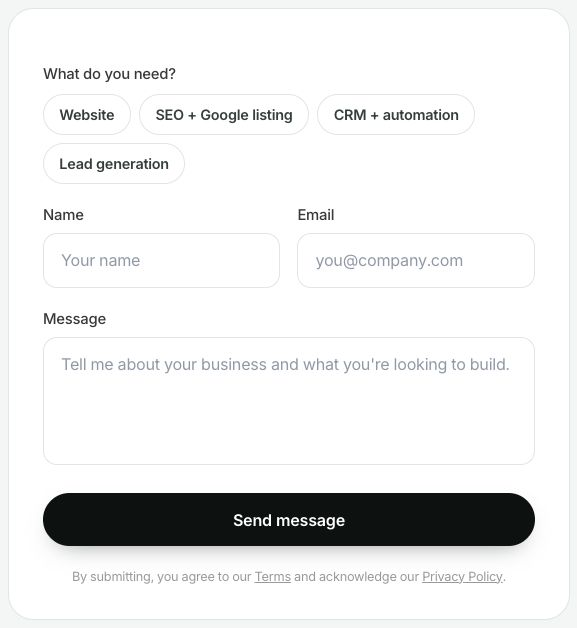
WinflowAI’s own form, captured September 6, 2026. The service choice helps route the conversation; the message supplies context. Add location or other qualifying questions only when they affect your decision. Select the image to enlarge. Rewrite vague questions
Replace “Tell us more” with “What would you like cleaned, and how often?” Replace “Project details” with a short hint such as “Office size, city, and preferred start date, if known.” Avoid demanding an exact budget or technical specification before the person understands the service.
Before After Project details What work do you need help with? Address required City or service location Upload all plans Upload a plan if you have one (optional) Submit Send inquiry 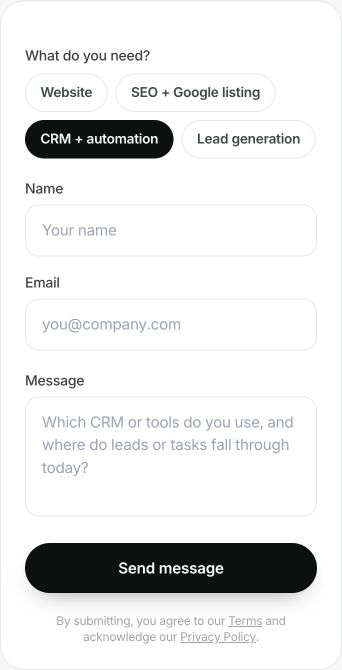
A useful prompt asks for context the business can act on. Here, choosing CRM + automation changes the message hint to ask which tools the visitor uses and where work gets missed. WinflowAI’s local form, September 6, 2026. Select the image to enlarge. Define the response for each route
Suitable inquiries should reach the right person. For work you do not offer, give a clear, polite explanation and an appropriate next step. Do not silently discard the submission. Only promise a reply time the team can meet. Keep marketing consent separate from the act of asking about a service.
Test the form with someone new
Ask a person unfamiliar with the business to complete it on a phone and explain any confusing question. Check keyboard access, visible labels, helpful errors, and a successful submission. Follow the full contact-form test to verify saved answers and notifications.
You’re finished when…
A new visitor understands the questions, can finish on a phone, and knows what happens after sending. The team receives enough information to take the next step.
If you get stuck
Should every field be required?
Require only what you need to accept and respond to the inquiry. Optional detail can help without blocking someone who does not know the answer.
We get unsuitable inquiries
First clarify the service and exclusions on the page. Add a qualifying question only when its answer changes routing or the reply.
Should the form book an appointment automatically?
Only when that fits your actual process. If you review suitability first, say so and avoid implying a booking is confirmed.
Official sources and further reading
Reviewed September 6, 2026. Platform menus can vary by account and change over time. Examples and checklists are WinflowAI’s own guidance; follow the linked vendor instructions for your account.