Website care
Your monthly website checklist
Keep the routes customers use working. A monthly check should catch broken paths and outdated facts, then give each real issue an owner.
The whole process, at a glance
- Test the customer path1 of 3
- Check current facts2 of 3
- Assign the fixes3 of 3
Before you start
This is a practical baseline for a small business site. High-volume stores and critical booking systems may need more frequent monitoring. Know who handles technical maintenance under your support agreement.
A practical example
| Check | Evidence |
|---|---|
| Forms | Labeled inquiry found at its destination |
| Booking and contact links | Correct page or number opens |
| Business facts | Current hours, services, and contact details |
| Maintenance | Responsible person and agreed scope |
| Problems | URL, screenshot, owner, and recheck date |
Follow these steps
Send a labeled form test
Complete the end-to-end form check. Confirm the saved inquiry, staff notification, and promised customer reply. Test each distinct route that sends inquiries to a different person. Check the spam folder and notification recipient after staff changes.
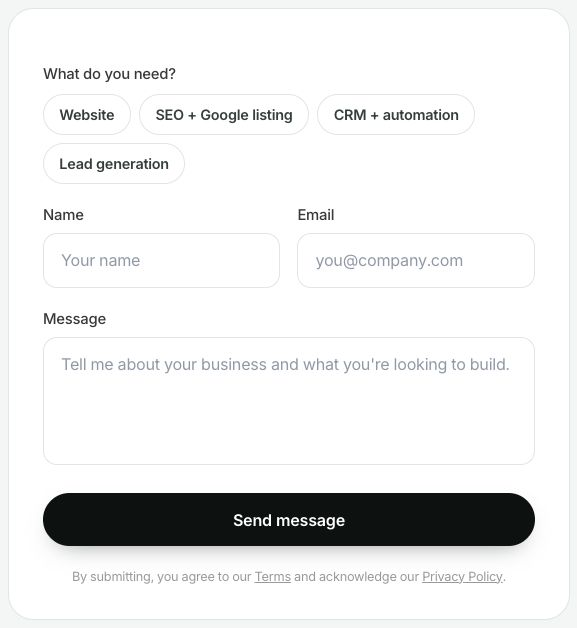
WinflowAI’s own form, captured September 6, 2026. Your monthly check should follow an authorized test submission through to its saved record and recipient. A screenshot alone cannot confirm delivery. Select the image to enlarge. Follow the important links
On a phone and desktop, open the main menu, service pages, phone links, email links, and booking path. Check the actual appointment or checkout destination without making a real purchase. Look for broken images, unreadable text, expired offers, and notices that hide essential buttons.

The footer is another place to check business details and destinations. Follow each social link and confirm it reaches the correct public profile. WinflowAI’s local website, September 6, 2026. Select the image to enlarge. Check business facts and upcoming dates
Review hours, holiday closures, service areas, contact details, and the services you offer. Compare the website with Google and active social profiles using the business-details checklist. Update information when it changes; leave accurate material alone.
Look at inquiries and meaningful trends
Count genuine inquiries, suitable inquiries, and bookings over consistent date ranges. Check source data where available. If search traffic drops unexpectedly, inspect the relevant URLs in Search Console before guessing at a fix. Small numbers fluctuate, so one quiet week is not proof of a website problem.
Check maintenance ownership and record issues
For software you manage, confirm backups, updates, and renewal responsibilities with the maintainer. Hosted builders handle different parts of this job than self-hosted WordPress. Do not install untested updates or restore backups casually. Record the issue, page, screenshot, owner, and target date; recheck after the fix.
You’re finished when…
Customer paths work, public facts are accurate, and any unresolved problem has a person responsible for the next step.
If you get stuck
Do I need to publish something every month?
No. Add or change content when it helps customers. Do not rewrite accurate pages solely to look active.
Is this the same as a maintenance plan?
No. This is an owner’s check. Backups, software updates, recovery, monitoring, and content changes depend on the actual platform and support scope.
A critical form is broken
Report it promptly with the URL and test details. If appropriate, display a working alternate contact route while the issue is fixed.
Official sources and further reading
Reviewed September 6, 2026. Platform menus can vary by account and change over time. Examples and checklists are WinflowAI’s own guidance; follow the linked vendor instructions for your account.
Useful next guides


Need help with your website or inquiry workflow? See how WinflowAI can help.