Google and local search
How to check whether Google indexed your website
Being online and being in Google’s index are different things. Check the exact page you care about, then use its result to decide what to do next.
The whole process, at a glance
- Inspect one exact URL1 of 3
- Read the reason2 of 3
- Fix and check again3 of 3
Before you start
You need access to the website’s Search Console property. Start with the homepage and one important service page. Ask the property owner for access if needed.
A practical example
| What you see | What to do |
|---|---|
| Indexed | Check the correct page, then leave it alone if healthy |
| Redirect or alternate | Inspect the intended destination or canonical |
| Not indexed unexpectedly | Read the stated reason before changing anything |
| Live test passes | Still wait for a separate indexing decision |
Follow these steps
Inspect the complete page address
Open Search Console, choose the property, and paste the full page URL into the inspection bar. Include
https://and the actual page path. The URL must belong to the selected property. A homepage result says nothing about every other page.
Paste the complete page address into the inspection bar, then press Enter. WinflowAI’s homepage is the live example, captured September 6, 2026. Select the image to enlarge. Read the indexed result
URL is on Google means the page is indexed and may appear in search; it does not promise rankings or appearance for a particular query. URL is not on Google needs a closer look. Expand Page indexing and read the reason, last crawl, and Google-selected canonical, which is the version Google treats as the main page.
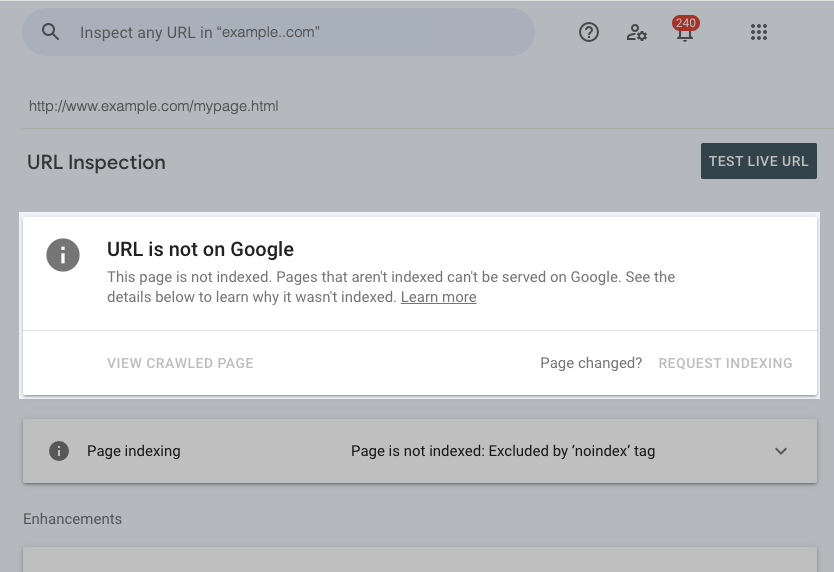
Unmodified example from Google Search Console Help, checked September 6, 2026. This is an example.com screenshot, not a result for your website. The dimming is part of Google’s source image. Select the image to enlarge. 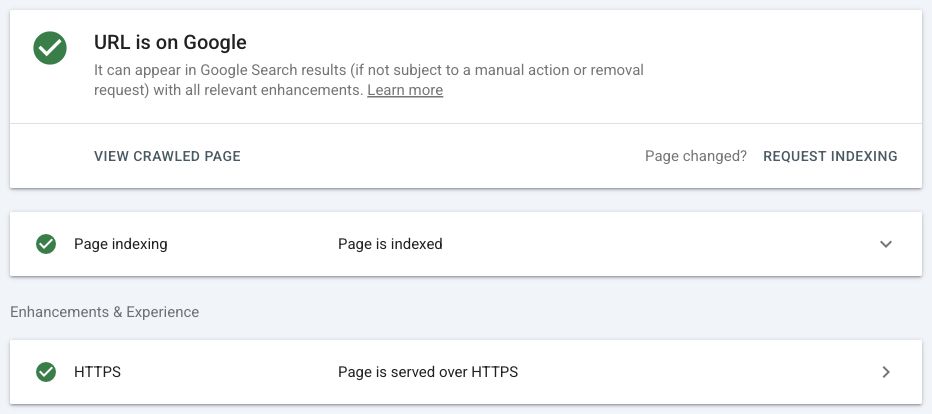
An indexed example from WinflowAI’s own property, captured September 6, 2026. This describes the inspected homepage, not every page on the site. Select the image to enlarge. Decide whether the exclusion is a problem
A redirect or duplicate can be intentional. A private thank-you page may deliberately be excluded. For an important public service page, an accidental
noindexinstruction, a server error, or the wrong canonical needs investigation. Send the exact URL and reported reason to your developer; do not remove every indexing restriction on the website.Use the live test after a fix
Choose Test live URL to check what Google can fetch now. This is different from the stored indexed result. A successful live test does not put the page into the index and cannot settle every indexing condition. Check the rendered page where available to see whether the main content loads.
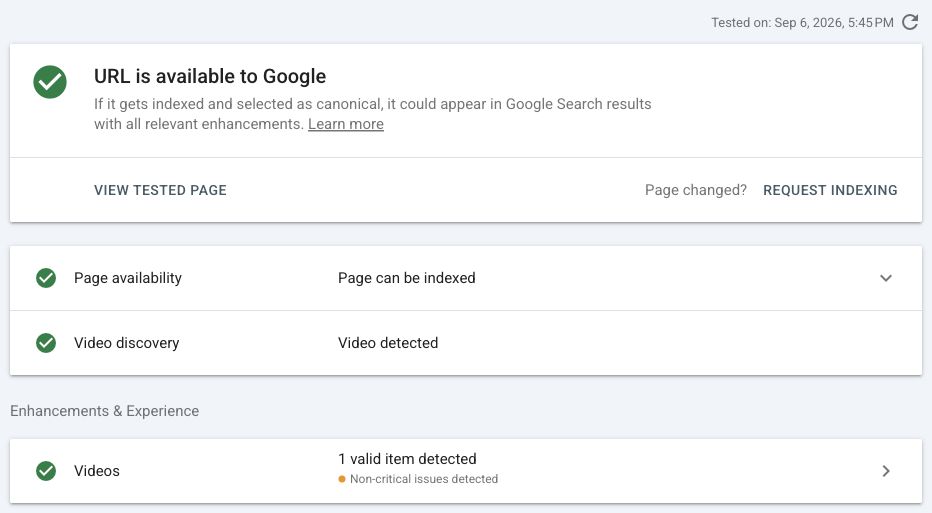
The live test checks current availability. It does not prove that Google has indexed a recent change. WinflowAI’s homepage, tested September 6, 2026. The separate video warning does not change the page-availability result. Select the image to enlarge. Request indexing when appropriate
For a new or corrected public page, an owner or Full user can choose Request indexing. For many pages, use a sitemap as well. Repeated requests do not speed the process. Record the URL and check date, then revisit the report later; crawling may take days or weeks and inclusion is not guaranteed.
You’re finished when…
You know the current index status of each important URL and have either confirmed it is expected or recorded a specific fix and follow-up.
If you get stuck
Google search does not show my new page
A search for site:example.com is a rough spot check, not a complete inventory. Use URL Inspection for the exact page.
The live test passes but the stored result is old
The live test and indexed result describe different moments. Wait for another crawl and indexing decision, then inspect again.
Google chose another canonical
Compare the chosen URL with your intended main page. Redirects, duplicate content, internal links, and canonical tags can all matter. Ask your developer to review them together.
Official sources and further reading
- Google: URL Inspection and result meanings
- Google: requests to recrawl
- Google: limitations of the site operator
Reviewed September 6, 2026. Platform menus can vary by account and change over time. Examples and checklists are WinflowAI’s own guidance; follow the linked vendor instructions for your account.
Useful next guides

Need help with your website or inquiry workflow? See how WinflowAI can help.