

How to get a Gemini API key for n8n and Claude Code (it's not OAuth)
If you're using Google Gemini for the AI steps, whether in a coding setup like Claude Code or an n8n automation we built, you'll need your own Gemini API key. Good news: this is the easiest of the Google setups: a single API key, no OAuth screens.
- Go to aistudio.google.com/apikey and sign in
- Click Create API key (pick or create a project)
- Copy the key (it starts with
AIza…) - Add it to a local
.envfile (Claude Code / your code), or paste it into an n8n credential
1. Open Google AI Studio
Go to aistudio.google.com/apikey and sign in with the Google account you want to use. Google AI Studio is the home for Gemini API keys. You don't need the Google Cloud Console for this (though AI Studio links to a Cloud project behind the scenes).

2. Create the API key
Click Create API key. Give the key a name, pick the Google Cloud project it belongs to under Choose an imported project, then click Create key. Google generates the key right away.
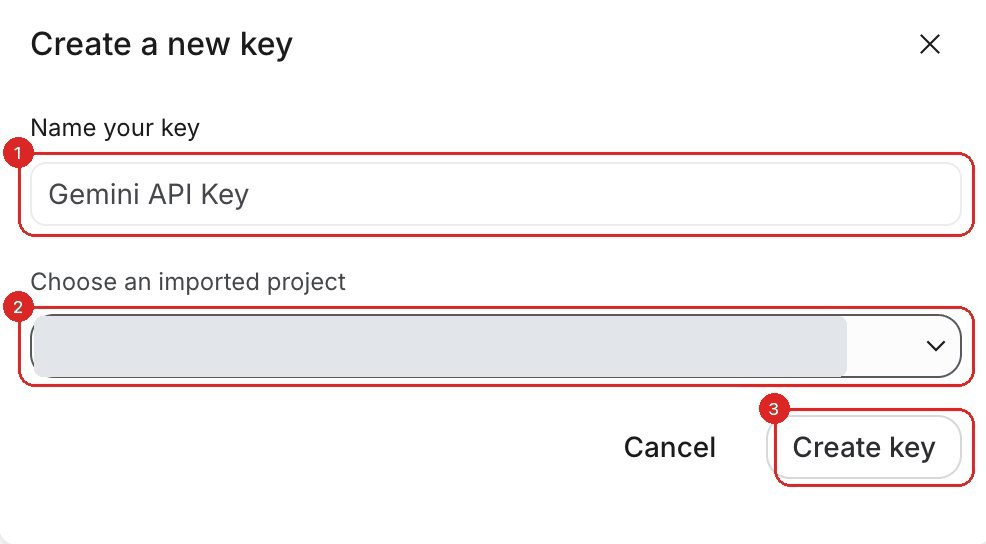
Copy the key. It starts with AIza. Unlike most providers, AI Studio lets you view existing keys again later on the same page, so you're not locked out if you misplace it, but still store it safely.
3. Free tier vs. billing
The Gemini API has a free tier with rate limits that are fine for testing and light automations. If your workflow needs higher limits or production volume, enable billing on the linked Google Cloud project and you'll be billed per token.
For current limits and rates, see Google's Gemini API pricing. Free-tier availability can vary by country.
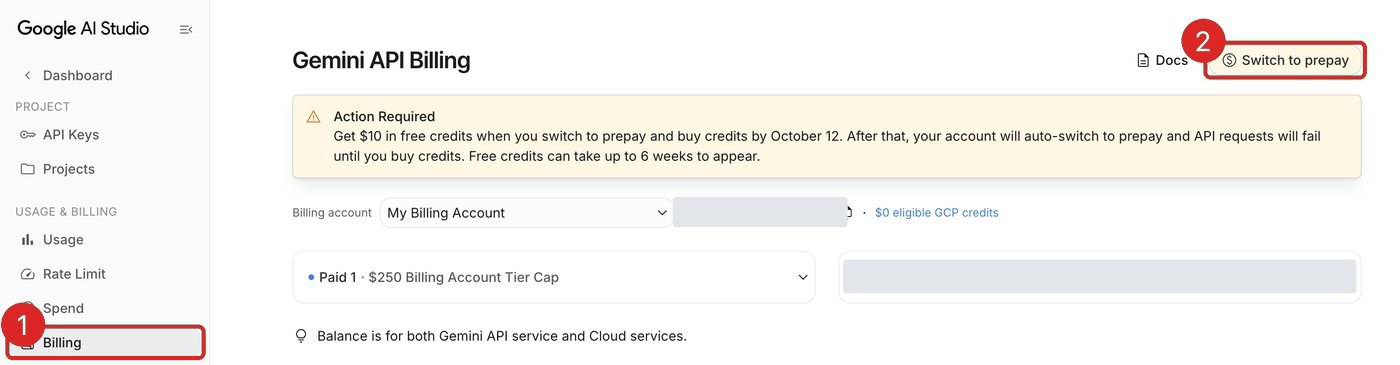
AI Studio now has its own Billing page in the left menu. When we checked on September 28, 2026, it showed a notice that accounts are moving to prepaid credits: after October 12, 2026, API requests fail until you buy credits. Check this page before you rely on a key in an automation.
4. Add the key to your local environment (Claude Code / coding)
If you're working in a coding environment like Claude Code, the key lives in your project's environment, not in a UI. The standard place is a .env file:
- In your project folder, create a file named
.env(or open the one already there). - Add a line with your key:
GEMINI_API_KEY=AIza... - Add
.envto your.gitignoreso the key is never committed to git. - The Google GenAI SDK reads
GEMINI_API_KEYfrom the environment automatically, so the key stays out of your code.
GEMINI_API_KEY, not GOOGLE_API_KEY. The Google GenAI SDK reads both, and if both are set, GOOGLE_API_KEY wins. A stray GOOGLE_API_KEY from another Google tool can silently override yours, so set just GEMINI_API_KEY to keep it clean.
5. Or connect the key in n8n
Prefer n8n? The same key goes on a Google Gemini (PaLM) API credential, which the AI nodes then reuse:
- Open your workflow and click the Google Gemini Chat Model node (it sits under an AI Agent node).
- In the node's Credential dropdown, choose Create New Credential. The type is Google Gemini (PaLM) API.
- Paste your key (
AIza…) into the API Key field and save. - Back on the node, pick a model from the dropdown (the model is set here, not on the credential).
- Click Execute / Test step. If it returns a response, you're connected.
That's it. Whether in your code or in n8n, every Gemini step now uses your key and your quota.
GEMINI_API_KEY vs GOOGLE_API_KEY: which to set
The Google Gen AI SDK reads both GEMINI_API_KEY and GOOGLE_API_KEY. Per Google's docs, if both are set, GOOGLE_API_KEY takes precedence. That trips people up: you rotate one key, but the app keeps using the other.
- Set only one. For a Gemini-only project,
GEMINI_API_KEYis the clearer choice;GOOGLE_API_KEYis the broader Google Cloud variable. - If a fresh key "isn't working," check for a leftover
GOOGLE_API_KEYquietly winning: runecho $GOOGLE_API_KEY(orecho $env:GOOGLE_API_KEYin PowerShell) and unset it. - In n8n this doesn't apply. The Gemini credential holds the key directly, so there's no environment-variable conflict to worry about.
Official reference
Google updates AI Studio from time to time. If a screen looks different from this guide, their own docs are the source of truth: Google AI Studio API keys and the Gemini API key docs. For the n8n side, see n8n's Google Gemini credential docs.
FAQ
Is this the same as the Google OAuth setup for Gmail and Sheets?
No. Gemini uses a simple API key (starting with AIza) from Google AI Studio. Gmail, Sheets, and Calendar use OAuth2 (a Client ID and Secret). For Gemini you don't touch an OAuth consent screen or redirect URL.
Where do I put the key in Claude Code or my code?
Store it as the GEMINI_API_KEY environment variable, typically in a .env file that you add to .gitignore. The Google GenAI SDK reads it automatically. It also reads GOOGLE_API_KEY, which takes precedence if both are set, so use only GEMINI_API_KEY.
Is the Gemini API free?
There's a free tier with rate limits, fine for testing and light use. For higher limits, enable billing on the linked Google Cloud project. See Google's pricing page for current details.
I lost my key. Can I get it back?
Yes. Unlike most providers, Google AI Studio lets you view your existing keys again on the API keys page. You can copy an existing key or create and delete keys there anytime.


Want us to set it up for you?
We build AI lead generation and CRM automations, and handle the wiring, keys, and quotas so you don't have to.
Book a free 30-minute call