

How to get an Anthropic (Claude) API key for Claude Code and n8n
If you're using Claude (by Anthropic) for the AI steps, whether in a coding setup like Claude Code or an n8n automation we built, you need your own Anthropic API key. This walkthrough gets you from zero to a working key, then shows both ways to use it: pasted into a local .env file or connected in n8n.
One thing to know up front: the Anthropic API is separate from a Claude.ai chat subscription. A Claude Pro plan does not include API access. You set up API billing separately, and it's pay-as-you-go (you only pay for what your automation actually uses).
- Create an account at platform.claude.com
- Add prepaid credits under Billing
- Go to API Keys → Create Key, then copy it (shown once)
- Add it to a local
.envfile (Claude Code / your code), or paste it into an n8n credential
1. Create your Anthropic Console account
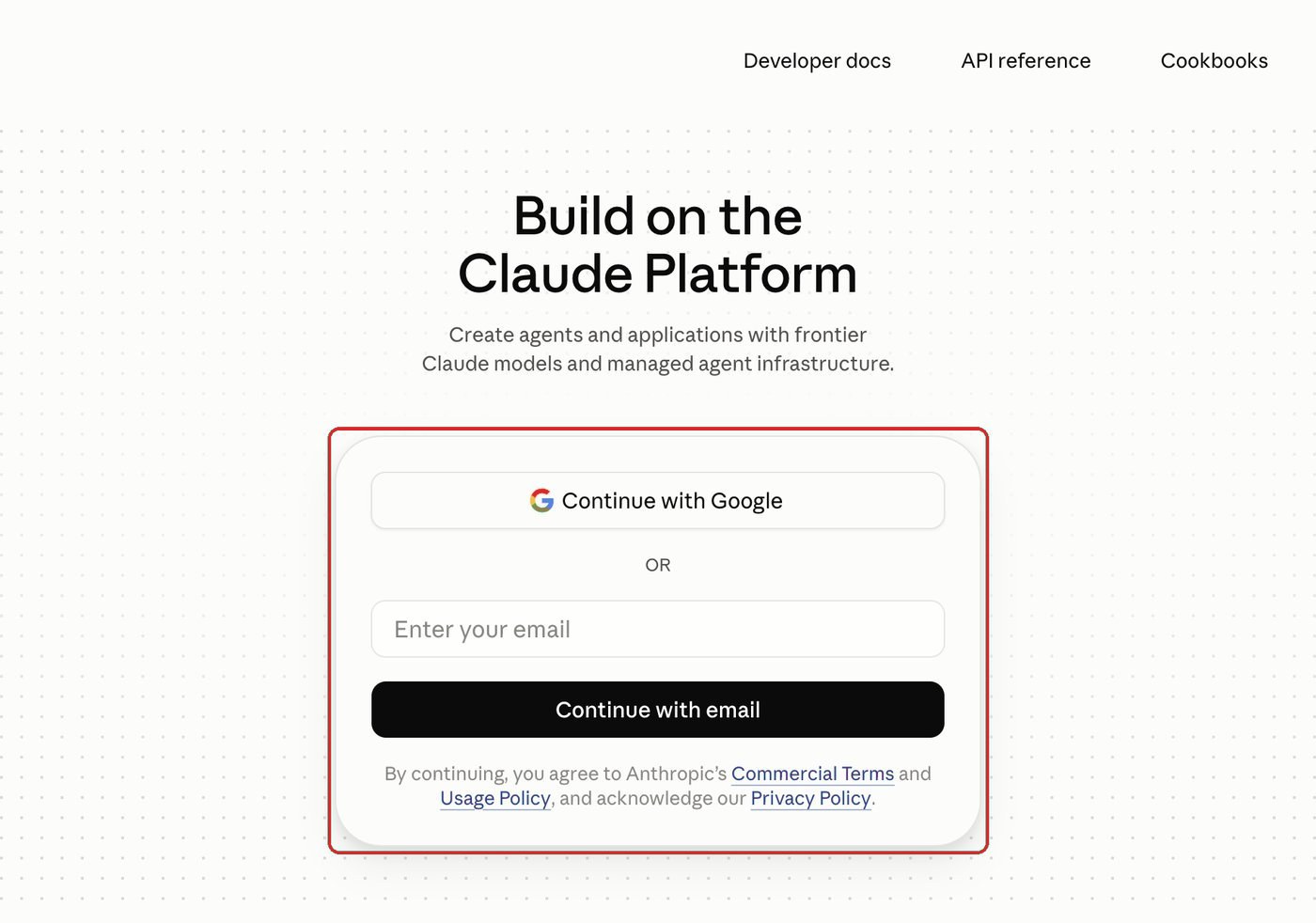
Go to platform.claude.com and sign up (or log in). The old console.anthropic.com address now opens this same page, which is labeled Claude Console. This is the developer console, a different place from the Claude.ai chat app. If you already chat with Claude, you'll still need to register here for API access.
2. Add credits (set up billing)
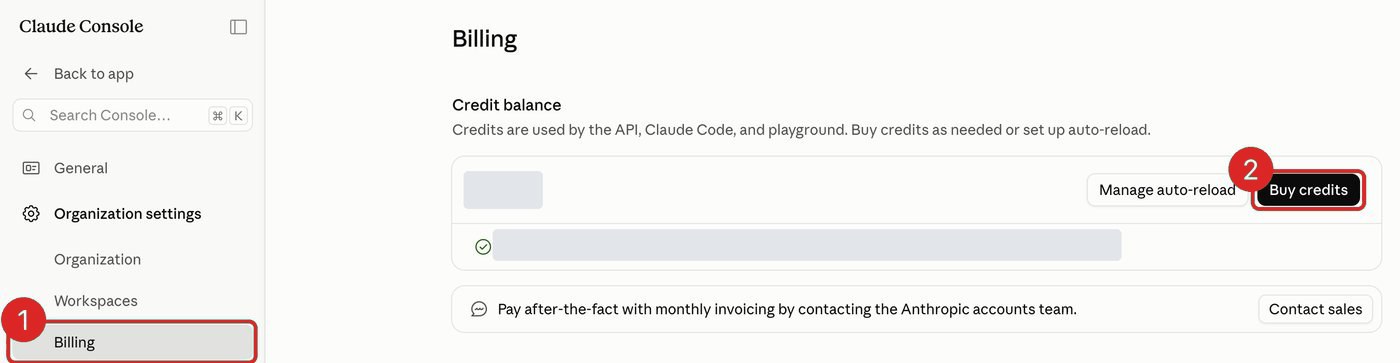
The API runs on prepaid credits. In the Console, open Billing in the left menu and choose Buy credits. A small amount like $5 is plenty to test an automation. Without credits, every request fails with a "credit balance too low" error.
Cost is per token (input + output) and depends on which model you use. For current rates, check Anthropic's pricing page. Most lead-gen and admin automations cost cents per run.
3. Create the API key
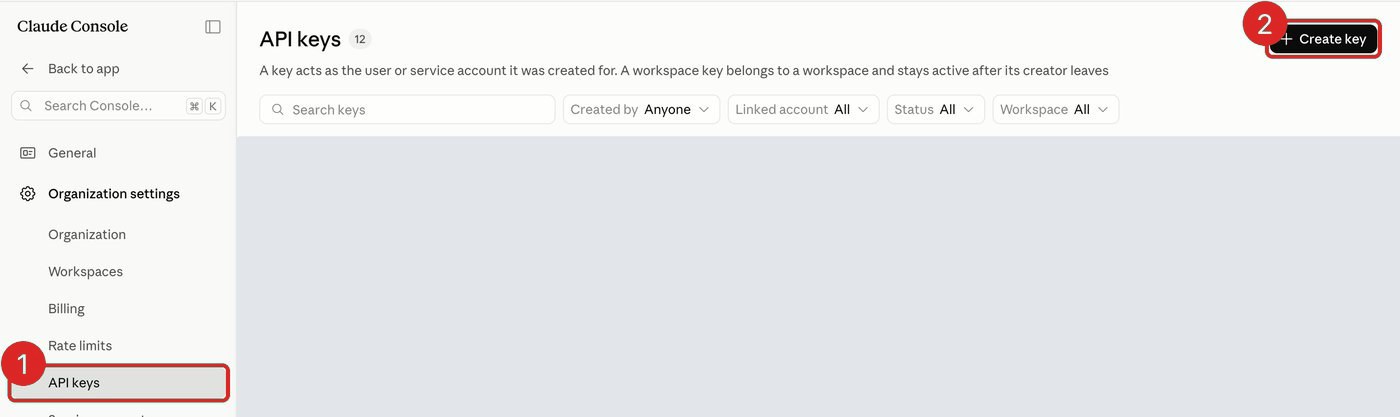
In the Console's left menu, open API keys and click Create key.
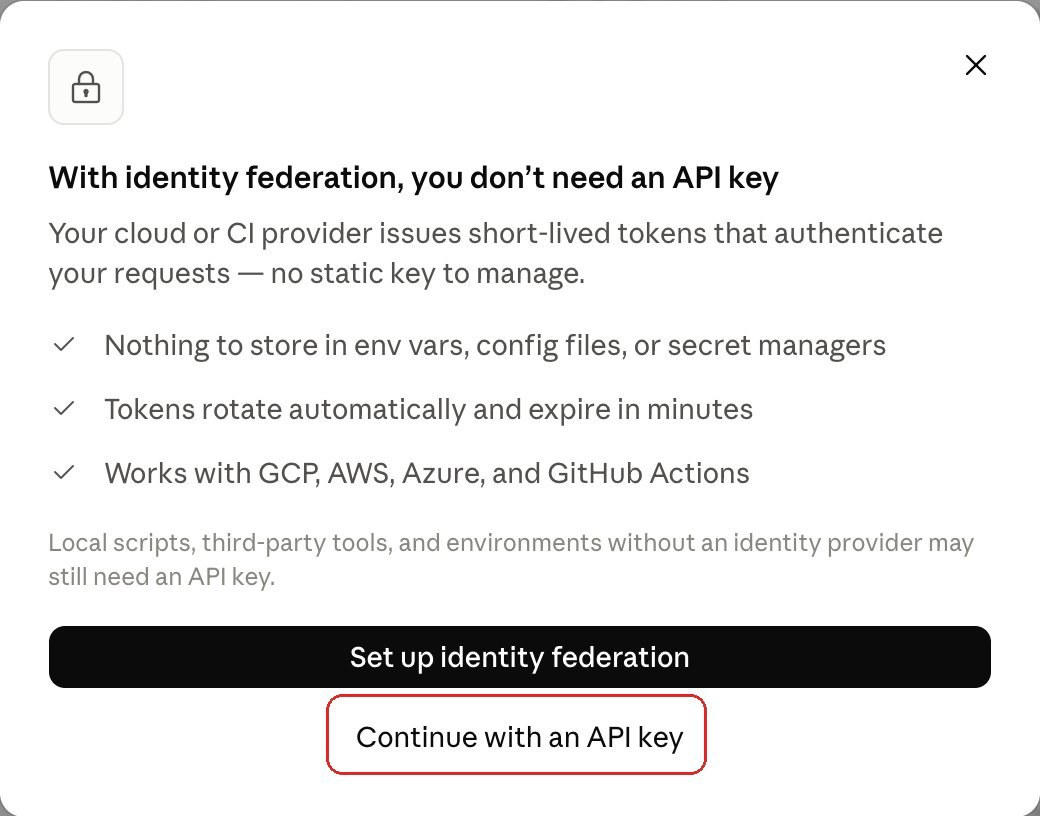
A pop-up may suggest identity federation instead. That option is for apps running on GCP, AWS, Azure, or GitHub Actions. For n8n, Claude Code, or a script on your own computer, choose Continue with an API key.
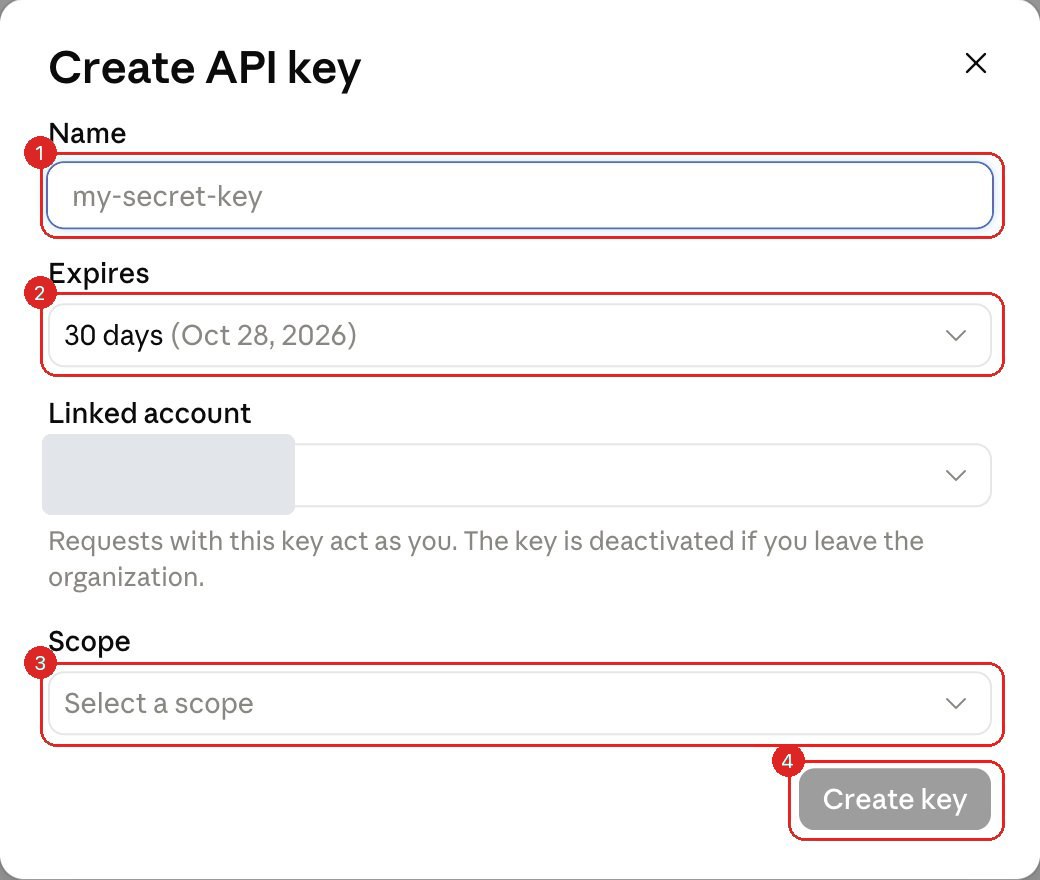
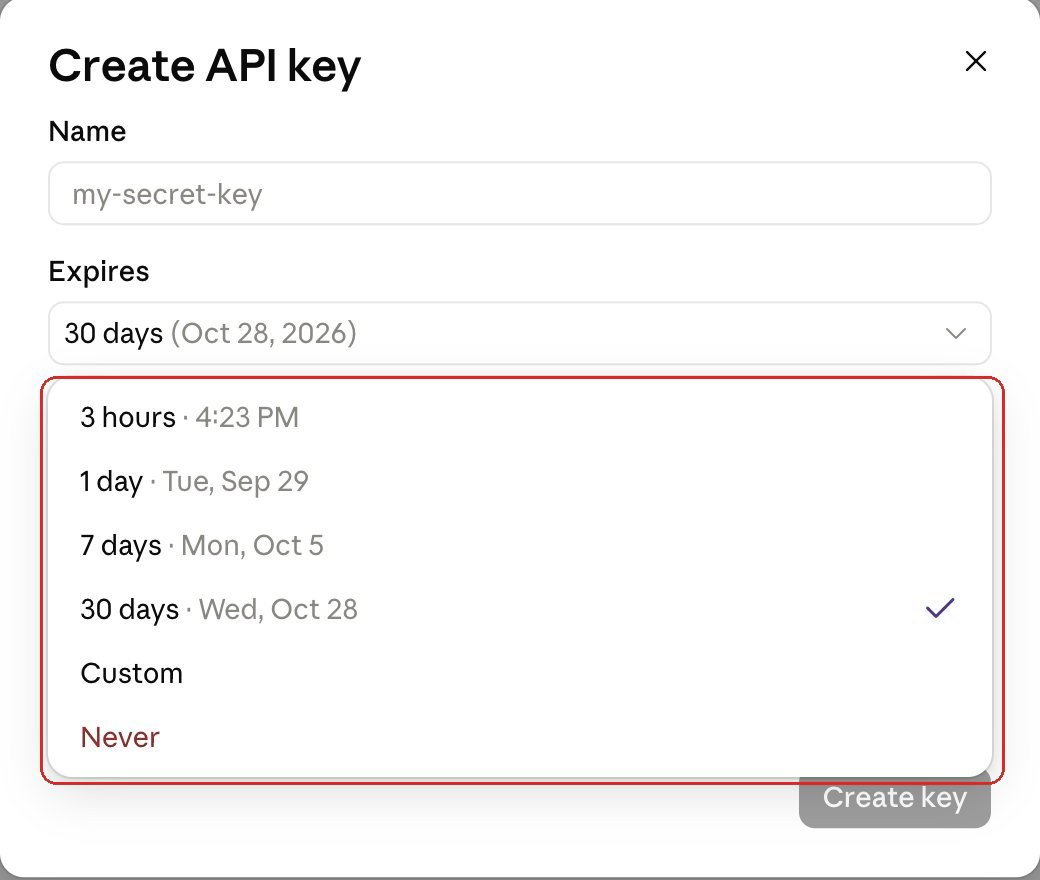
In the form, give the key a name you will recognize later (for example claude-code or n8n-production) and pick a Scope from the list. Check Expires before you click Create key: it starts at 30 days, and a key used in an automation stops working the day it expires. For an automation, choose a longer Custom date and put a reminder in your calendar to replace the key.
Anthropic shows you the full key exactly once. It starts with sk-ant-. Copy it immediately and paste it somewhere safe (a password manager). If you close the dialog without copying, you'll have to revoke it and create a new one. You can't view it again.
4. Add the key to your local environment (Claude Code / coding)
If you're working in a coding environment like Claude Code, the key lives in your project's environment, not in a UI. The standard place is a .env file:
- In your project folder, create a file named
.env(or open the one already there). - Add a line with your key:
ANTHROPIC_API_KEY=sk-ant-... - Add
.envto your.gitignoreso the key is never committed to git. - The Anthropic SDK reads
ANTHROPIC_API_KEYfrom the environment automatically, so the key stays out of your code.
ANTHROPIC_API_KEY from your shell environment, not from a .env file directly. Export it in your shell (export ANTHROPIC_API_KEY=sk-ant-...) or use a loader like direnv. Note that Claude Code normally signs in with your Claude subscription, so setting this key routes that usage through your API billing instead. Only set it if that's what you want.
5. Or connect the key in n8n
Prefer n8n? The same key goes on an Anthropic credential, which the AI nodes then reuse:
- Open your workflow and click the Anthropic Chat Model node (it sits under an AI Agent node), or add an Anthropic node.
- In the node's Credential dropdown, choose Create New Credential.
- Paste your key (
sk-ant-…) into the API Key field and save. - Back on the node, pick a model from the dropdown (the model is set here, not on the credential).
- Click Execute / Test step. If it returns a response, you're connected.
That's it. Whether in your code or in n8n, every AI step now runs on your key and your credits.
Fix the "credit balance is too low" error
If a request fails with "Your credit balance is too low to access the Anthropic API," the key works fine. The account is simply out of prepaid credit. Anthropic's API is prepaid and has no card-on-file auto-billing by default:
- Add prepaid credits under Billing in the Anthropic Console. Even $5 is enough to test an automation.
- Turn on auto-reload if you want credits to top up automatically when the balance runs low, so live automations don't stall.
- Confirm the key belongs to the workspace you funded. A key from a different workspace won't see those credits.
- Remember API credits are separate from a Claude Pro or Max subscription. A chat plan adds no API balance.
Official reference
Anthropic's dashboards change from time to time. If a screen looks different from this guide, their own docs are the source of truth: the Anthropic Console and Anthropic API docs. For Claude Code, see the Claude Code authentication docs. For the n8n side, see n8n's Anthropic credential docs.
FAQ
Is the Claude API free?
No, it's pay-as-you-go. You add prepaid credits and are billed per token. It's separate from a Claude.ai chat subscription, which does not include API access.
Where do I put the key in Claude Code or my code?
Store it as the ANTHROPIC_API_KEY environment variable, typically in a .env file that you add to .gitignore. The Anthropic SDK reads it automatically. Claude Code reads it from your shell environment, so export it there or use direnv; setting it routes Claude Code usage through your API billing rather than a subscription.
I lost my key. Where do I find it again?
You can't. Anthropic shows the full key only once. Revoke the old one under API Keys in the Console and create a new key.


Want us to set it up for you?
We build AI lead generation and CRM automations, and handle the wiring, keys, and scopes so you don't have to.
Book a free 30-minute call