CRM and automation
How to test an automation before turning it on
A green workflow run is not enough. Check the actual records and messages, including what happens when the input is messy or one service stops working.
The whole process, at a glance
- Write expected results1 of 3
- Run normal and broken cases2 of 3
- Check recovery and release3 of 3
Before you start
Use a test workspace or isolated records and an inbox you control. List every action that can create a record, send a message, charge money, or change access. Disable live customer side effects while testing.
A practical example
| Test input or failure | Expected result |
|---|---|
| Valid TEST-INQUIRY-001 | Correct CRM records and one notification |
| Same event delivered twice | No second deal or notification |
| New inquiry, existing email | Same contact; intended new opportunity |
| Email missing | Useful rejection or manual review |
| CRM unavailable | Visible failure and safe recovery |
| Notification fails after save | Existing deal retained; recover the message |
Follow these steps
Write one clear acceptance rule
For an inquiry workflow: one valid submission should create the intended CRM records, assign an owner, and send one notification. The same event replayed should not create a second deal. A different inquiry from the same person may be valid new work. Write the rule before you run the test.
Prepare a traceable test record
Use a label such as
TEST-INQUIRY-001, a fictional name, and an email inbox you control. Example data on paper can usealex@example.com, but that address is not a delivery-test inbox. Record the expected stage, owner, and message destination. Keep a unique test ID visible across the form, workflow execution, and CRM.Run the normal case and inspect the destination
Execute the complete workflow, not just its first node. Check the saved contact, deal, relationship, owner, and notification. Compare each field with the input. For n8n forms, the Test URL and Execute Workflow support interactive testing; a production execution is inspected through execution history.
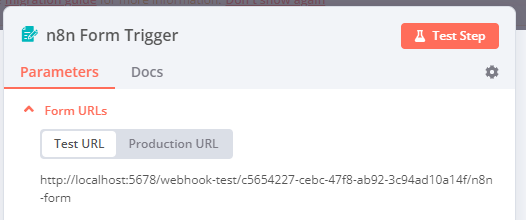
Unmodified screenshot from n8n’s Form Trigger documentation, checked September 6, 2026. The source image uses the older Test Step label. Use Execute Workflow to test downstream steps too; production requires the published workflow. The localhost address is n8n’s example, not a URL to copy. © n8n GmbH · License and Commons Clause notice. Select the image to enlarge. Run the failure cases deliberately
Test a required value missing, invalid email, repeated event ID, new event from an existing contact, CRM failure, and notification failure after the CRM write. Simulate failures in the test environment rather than breaking a live account. Check that bad input goes to a known review or rejection path and that failures alert the right maintainer.
Test retry and partial recovery
A retry should continue safely from what already succeeded. Check whether a timeout happened before or after a remote service accepted the action. Repeating the whole workflow blindly can duplicate records or messages. In n8n, configure the error workflow and test an automatic execution failure as well; manual testing does not prove that production error notifications will run.
Approve a small launch and monitor it
Record actual versus expected results and resolve failed cases. Confirm credentials, URLs, owner, alert destination, and how to stop new runs. An n8n Form Trigger uses the Production URL for a published workflow. After approval, monitor the first real runs and compare the downstream records. Pausing new triggers may not stop work already waiting or queued; include those in your stop procedure.
You’re finished when…
Every required case has an observed result, failures have been fixed and retested, and someone owns monitoring, recovery, and the decision to launch.
If you get stuck
The workflow says success but the record is wrong
Inspect the actual destination and mapped fields. A successful request can still write the wrong stage, owner, or record.
Can I test by messaging a real customer?
Use an inbox or destination you control first. A real customer message needs a separate deliberate decision and appropriate authorization.
How many tests are enough?
Cover each meaningful route and each consequential failure. Add cases when a defect reveals a missing rule rather than repeating the same successful input.
Official sources and further reading
Reviewed September 6, 2026. Platform menus can vary by account and change over time. Examples and checklists are WinflowAI’s own guidance; follow the linked vendor instructions for your account.