CRM and automation
How to map a process before automating it
Before asking software to do a job, explain how the job should work. Draw one real example from the starting event to a clear finished state.
The whole process, at a glance
- Name the starting event1 of 3
- Map actions and decisions2 of 3
- Define done and exceptions3 of 3
Before you start
Choose a small repeated process, such as handling a website inquiry. Talk to the person who does it now. This guide’s cleaning-business example is fictional and does not describe a client result.
A practical example
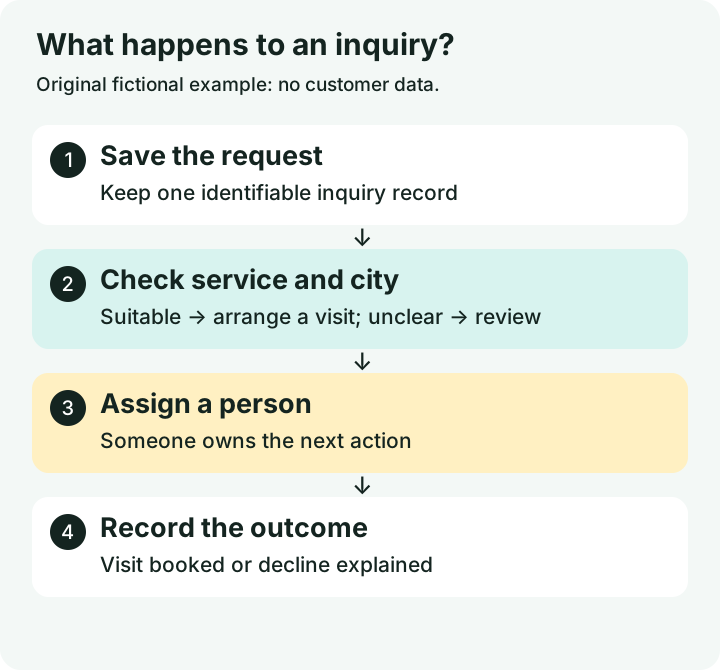
| Part of the example | Write this down |
|---|---|
| Trigger | One valid inquiry is saved |
| Decision | Do we offer this service in this city? |
| Owner | The coordinator on duty |
| Main record | The inquiry in the CRM |
| Exception | Missing city → manual review |
| Done | Visit booked or decline recorded |
Follow these steps
Name the trigger and the finished state
A trigger is the event that starts the work. Example: a valid website inquiry is saved. “Done” might mean the right person has reviewed it and recorded either a booked visit or a clear decline. “Email sent” is only done if sending the email was the entire job.
Write the normal path in everyday words
For the example: save the inquiry, check the service and city, assign a person, arrange a site visit, and record the outcome. Give each box one action. Use the words the team uses before choosing software nodes. Note which steps happen automatically and which need a person.
Put decisions where the route changes
Ask a precise question, such as “Is the city in our service area?” Label both routes. A suitable request goes to scheduling; an unsuitable one gets an explanatory reply. Unknown answers go to manual review. Do not treat a blank city as a confident yes or no.
Name the owner and the authoritative record
Pick one responsible person for each handoff. Name the system that holds the authoritative inquiry and status, often the CRM. Email notifications can point to that record. Decide what uniquely identifies one submission so the same event delivered twice does not create two jobs.
Add failures and walk through examples
Show what happens with a missing email, a duplicate event, a failed CRM write, and no owner available. Give the exception a destination and an alert recipient. Walk a real-looking test record through every branch. Only then choose which steps to automate and what evidence will prove the process works.
You’re finished when…
Someone unfamiliar with the process can follow a normal inquiry, an unsuitable inquiry, and a failure without guessing who acts next.
If you get stuck
Should the map include every mouse click?
Start with business actions and decisions. Add platform clicks only where they affect the handoff or implementation.
Which tool should I choose first?
Finish the small process map first. The required data, systems, decisions, and failure paths will help determine a suitable tool.
What if the process keeps changing?
Automate the stable part first and leave uncertain decisions with a person. Revisit the map when the business rule becomes clear.
Official sources and further reading
Reviewed September 6, 2026. Platform menus can vary by account and change over time. Examples and checklists are WinflowAI’s own guidance; follow the linked vendor instructions for your account.