Account access · Shopify
Give a Shopify collaborator access
Think of collaborator access as a work pass for your store. You decide which areas it opens. Your agency uses its own login.
The whole process, at a glance
- You share a request code 1 of 3
- Your agency sends a request 2 of 3
- You review and approve 3 of 3
Before you start
Open the existing store as its owner. Ask your agency to confirm the Shopify Partner identity you should expect on the request.
Follow these steps
-
Find the request code
In Shopify admin, open Settings → Users → Security. Some accounts show Users & permissions. Copy the four-digit collaborator code.
Settings → Users → Security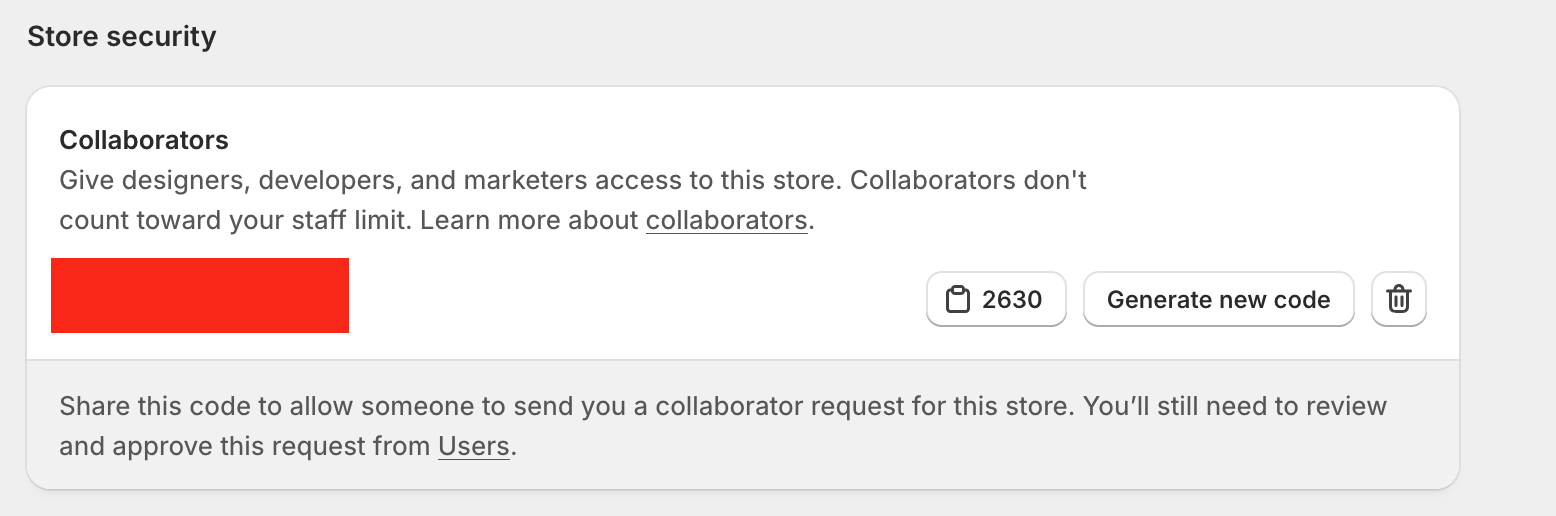
Select the code beside the clipboard icon to copy it. Use the code from your own store; the number pictured is only an example for this guide. Community screenshot from April 2026, checked against Shopify’s current instructions. Source: David Arbias, Shopify Developer Community. Select the image to enlarge. -
Send the code and store address
Privately send your agency the code and your store’s permanent myshopify.com address. For example: your-store.myshopify.com. Ask for help finding it if you are unsure.
Store address + collaborator request code -
Let your agency send the request
Your agency enters those details in its Partner account and chooses the permissions needed for the agreed work. The code lets it request access; your approval still comes next.
Pause here until the request arrives -
Review and accept
Open Settings → Users, filter by Requests, and open the expected request. Review its Roles and permissions, adjust them if needed, then select Accept request.
Requests → Review roles → Accept request
You’re finished when…
The request is accepted and your agency confirms it can open the store. If a needed area is missing, ask which permission is required and why.
If you get stuck
Which permissions should I approve?
Match them to the work you agreed on. Ask your agency to explain anything unclear before approval. Avoid choosing every permission just to get past this step.
Is this my login or two-step code?
Use only the four-digit collaborator request code from Users → Security. Keep your password, recovery codes, and sign-in verification codes private.
I cannot find the request
For a single store, the owner or a user with the Administrator role can approve it. Check the correct store and the Requests filter. If it is still missing, ask your agency whether it has sent the request.
How do I remove access later?
Under Settings → Users (or Users & permissions), select the collaborator, then Remove collaborator account → Remove. Regenerating the request code does not remove an approved collaborator.
Official instructions
- Shopify: codes, approval, and removal
- Shopify: how your agency requests access
- Shopify: what each permission allows
Checked against these documents on September 6, 2026. Menus can vary by account and change over time. If your screen differs, use the official guide or ask us before choosing broader access.
Sharing another account?


Working with WinflowAI? Reply to your project email if you need help with a step.